Interactive engineering workflows often need more than static forms or fully automated pipelines. In EXOKNOX, curve fitting and extrapolation require engineers to compare algorithms, tune parameters, and inspect results before simulation.
This article explains how we integrated marimo WASM notebooks as browser-based Python tools using Pyodide, Spring Boot security, shared Python wheels, and REST API integration.
Table of Contents
- The Engineering Data Problem
- Why marimo for Browser-Based Python Tools
- What We Built: marimo WASM Apps in Spring Boot
- How We Built the marimo WASM Deployment
- Trade-offs and Constraints of marimo WASM
- Benefits of Browser-Based Python Engineering Tools
- Conclusion: When marimo WASM Fits
- Let’s Discuss
The Engineering Data Problem
EXOKNOX is a platform for managing functional engineering data. Before simulation, engineers start with measured hysteresis data: repeated loading and unloading curves from physical tests. For downstream simulation, these data have to be reduced to a representative single curve and extrapolated beyond the measured force range.
This step cannot be fully automated. The correct result depends on engineering judgment: different smoothing, fitting, and extrapolation strategies can produce curves that are mathematically plausible but physically wrong. Engineers need to compare different algorithms, tune parameters, inspect the result, and repeat until the curve is suitable for simulation.
At the same time, we wanted to move away from EXOKNOX’s Java-based Eclipse RCP frontend.
So the requirement was clear: we needed a lightweight, browser-based Python tool with an interactive UI that could read and write EXOKNOX data.
Why marimo for Browser-Based Python Tools
Marimo is a reactive Python notebook framework. Unlike Jupyter, marimo notebooks are pure Python files — no JSON, no hidden state. Cells are reactive: when a value changes, all dependent cells re-execute automatically. It ships a clean web UI and can be deployed either as a running server application or as a WebAssembly (WASM) application that executes entirely in the browser via Pyodide.
The important requirements for us were: notebooks had to be versionable as normal source files, UI state had to be reproducible, and the same notebook had to support fast local development as well as browser-only deployment. Marimo fit that better than a traditional Jupyter workflow because the notebook is ordinary Python source and the dependency graph is explicit. A custom Vue or React UI would have offered more control, but at a much higher implementation cost for exploratory engineering workflows.
What We Built: marimo WASM Apps in Spring Boot
Before diving into the challenges, here’s what the final system looks like. The frontend/scripting module delivers two interactive data-analysis tools — Curve Editor and Load Fitting — as self-contained Python applications that run entirely in the browser. No Python server is needed at runtime.
The module is organized around two layers:
frontend/scripting/
├── build.gradle.kts          ← Orchestrates the entire Python + WASM build
├── common/                   ← Shared Python library (wheel)
│   ├── pyproject.toml
│   └── src/common/
│       ├── api/              ← HTTP client to access the backend REST API
│       └── curveprocessing/  ← Curve processing functions
└── marimoapps/
    ├── curveeditor/          ← marimo notebook app
    └── curvefitting/          ← marimo notebook app
common is a plain Python package built as a wheel (.whl).
It contains all business logic and is shared across both apps — as an editable uv workspace dependency during local development and as a pre-built wheel loaded at runtime inside the browser.
marimoapps contains the marimo notebooks. Each app declares common as a uv workspace dependency so that during development they share a single source tree. For WASM export, the common wheel is bundled alongside the app and loaded at runtime via micropip.
The high-level architecture is straightforward:
Browser
  └── marimo WASM app (Python running in Pyodide)
        ├── Fetches functional data via EXOKNOX REST API
        └── Writes results back via EXOKNOX REST API

Spring Boot Server
  ├── Serves marimo notebooks as static resources
  ├── Enforces OIDC authentication
  └── Provides the EXOKNOX REST API
There is no marimo server process and no Python runtime on the backend. Just static files, served securely, executing in the client’s browser.
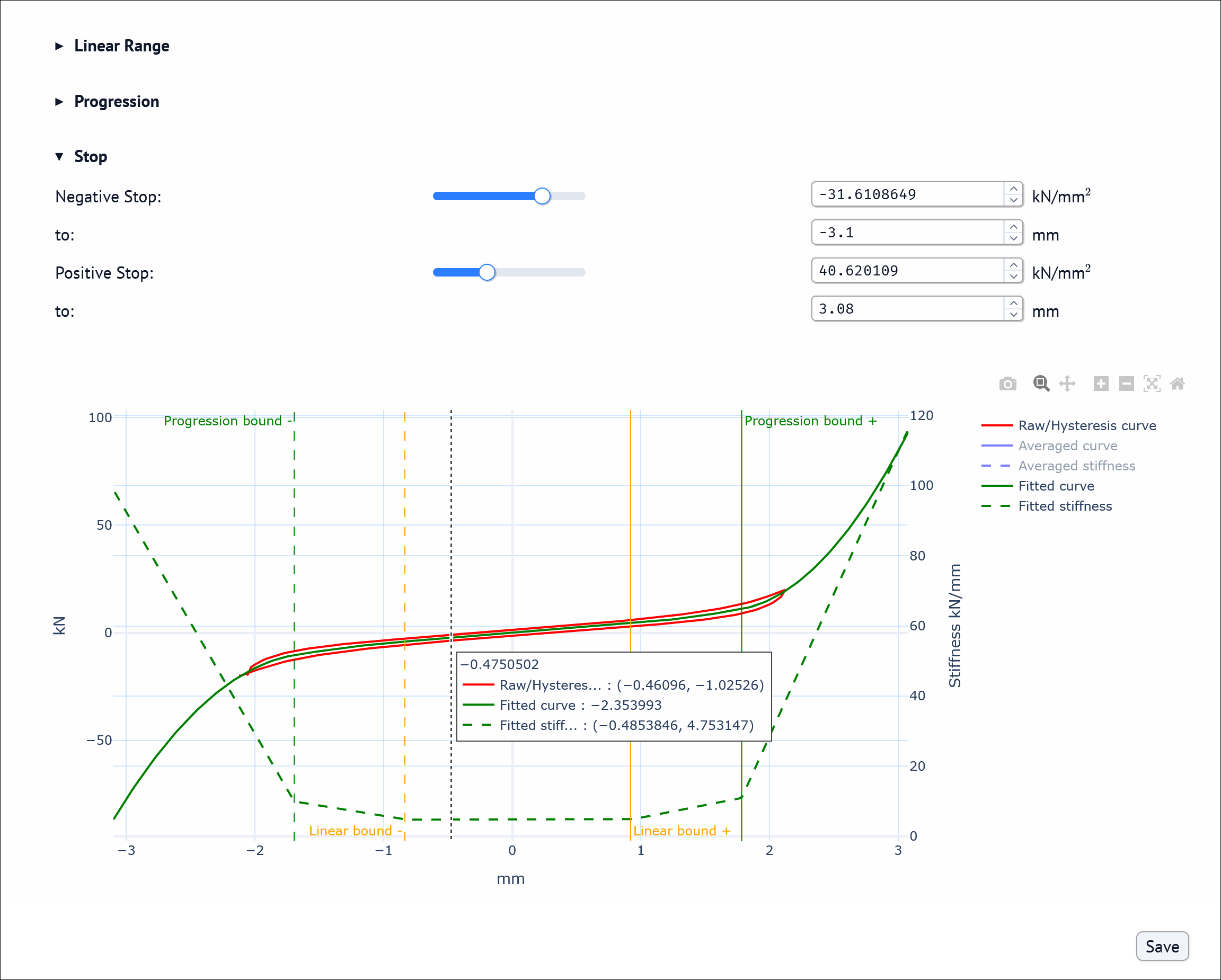
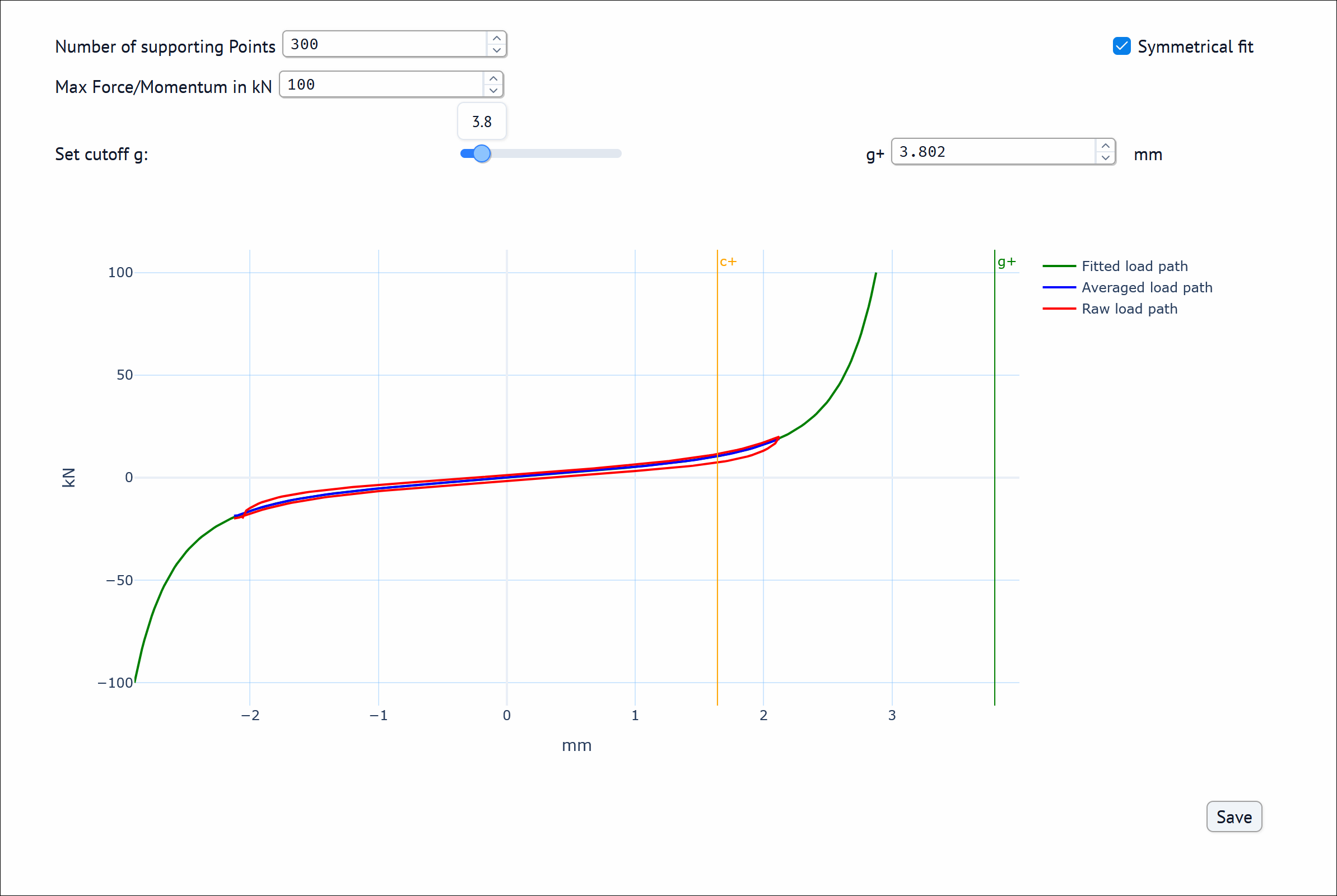
The resulting tools are embedded as web pages in the browser:
Curve Editor
Curve Fitting
Getting to this architecture required solving three concrete challenges.
How We Built the marimo WASM Deployment
Moving from proof of concept to production meant solving deployment, API, and development workflow constraints one by one.
Challenge 1 — Secure Static Notebook Deployment Without a marimo Server
The obvious deployment for marimo is as a server: you run marimo run notebook.py and marimo starts a WebSocket-backed application server that executes Python on the backend.
We evaluated this and rejected it for two reasons.
Security surface. A running marimo server executes arbitrary Python code from notebooks that are essentially customer property. Even sandboxed, this is an attack vector we preferred not to manage.
Infrastructure complexity. For on-premise installations — which many EXOKNOX customers require — spinning up and managing a persistent marimo server (or per-session containers in Kubernetes) places requirements on the customer’s infrastructure that we cannot guarantee.
The WASM approach removes the need to execute notebook Python on the backend. That significantly reduces the server-side attack surface, although the browser-side notebook still has to be treated like any authenticated frontend code. The Python runtime lives in the browser, execution is sandboxed by the browser’s security model, and the server is stateless. Backend access is secured by OIDC authentication and managed entirely by the browser.
From Notebook to Static WebAssembly Assets
marimo can export a notebook as a self-contained WASM application:
marimo export html-wasm notebook.py -o dist/notebook.html --mode run
The output is a static directory with an index.html, the notebook code, and the assets needed by the marimo WASM runtime.
We serve this from Spring Boot as static content, protected behind Spring Security’s OAuth2 login flow.
SecurityFilterChain securityFilterChain(HttpSecurity http,
                                        GrantedAuthoritiesMapper grantedAuthoritiesMapper,
                                        OpaqueTokenIntrospector opaqueTokenIntrospector,
                                        JwtAuthenticationConverter jwtAuthenticationConverter,
                                        SecurityFilter securityFilter) {

    // takes care of HTTP authorization - authorizationCustomizer secures the protected paths
    http.authorizeHttpRequests(this::authorizationCustomizer);

    // takes care of login (authentication flow)
    http.oauth2Login(oauth2 -> oauth2.userInfoEndpoint(userInfo -> userInfo.userAuthoritiesMapper(grantedAuthoritiesMapper)));

    // takes care of bearer tokens in the HTTP header - resourceServerCustomizer handles opaque and jwt tokens
    http.oauth2ResourceServer(oauth2 -> resourceServerCustomizer(oauth2, opaqueTokenIntrospector, jwtAuthenticationConverter));
}
The notebook is never accessible without authentication.
Wiring the Build with Gradle and uv
We needed the WASM export to happen automatically as part of the standard Gradle build — not as a manual step.
The build.gradle.kts uses the community plugin com.pswidersk.python-uv-plugin to drive uv commands from Gradle tasks, plus org.openapi.generator to generate Pydantic model classes from the backend’s OpenAPI specs.
The pipeline runs in four phases on every build:
Phase 1 — OpenAPI Code Generation.
The backend service modules expose REST APIs defined by OpenAPI YAML files.
Gradle scans those specs and runs OpenAPI Generator to produce Pydantic model classes.
We generate only the model layer, not the transport layer, because the generated clients assume a normal CPython HTTP stack, while the WASM runtime needs browser-based fetch through pyodide.http.
The generated models are synced into common/src/exoknox_<name>_client/models/, giving the shared library strongly typed data structures for every backend API response.
Phase 2 — Common Library Build.
uv build --managed-python produces common/dist/common-0.1.0-py3-none-any.whl.
This is a pure-Python, platform-neutral artifact that the browser will later fetch and install.
Phase 3 — Per-App WASM Export.
For each app discovered by scanning marimoapps/*/pyproject.toml, Gradle creates a task chain:
uvBuild<App>— builds the app package withuv.uvWasm<App>— runsmarimo export html-wasm, which bundles the notebook with the Pyodide Python runtime and produces a self-containeddist/wasm/directory.uvWheelCommon<App>— copies the common wheel intodist/wasm/public/, making it fetchable by the browser at a relative URL.copyWasmApplication<App>andbuildWasm<App>— copy the output tobuild/wasm/<app>/.
The top-level buildWasm task aggregates all per-app tasks.
The standard Gradle build task depends on buildWasm, so the full pipeline runs on every build with no extra steps.
Phase 4 — JAR Packaging. processResources includes the WASM output in the Spring Boot JAR:
from("marimoapps/$appName/dist/wasm") into("wasm/$appName")
Spring Boot then serves these static resources, making the apps accessible at:
/exoknox/marimo/curveeditor/index.html
/exoknox/marimo/loadfitting/index.html
Challenge 2 — REST API Integration from the Browser
A marimo WASM notebook runs entirely in the browser. It has no direct access to databases or backend services — it can only make HTTP requests. The data access model is exactly the same as any other frontend application. In the module we have a directory with Python modules that are bundled as a wheel into the WASM, providing access to the EXOKNOX REST API.
Browser-Based HTTP Requests with Pyodide
We built a Python module that uses Pyodide’s HTTP module to send HTTP requests to the backend (http_client.py).
The notebook fetches data from the EXOKNOX REST API using the user’s existing browser session.
In WASM mode, credentials="include" lets the browser attach the same authenticated session cookies it would use for the rest of the application.
import pyodide.http as http

async def get_request(url: str) -> str:
    request = await http.pyfetch(url, method="GET", credentials="include")
    response = await request.string()
    status_code = getattr(request, "status", None)
    if 200 <= status_code < 300:
        return response
    else:
        raise Exception(f"Error fetching {url} : {status_code}")
The write path mirrors the read path:
async def post_request(url: str, body: str) -> str:
    request = await http.pyfetch(
        url,
        method="POST",
        credentials="include",
        body=body,
        headers={"Content-Type": "application/json"}
    )
    response = await request.string()
    status_code = getattr(request, "status", None)
    if 200 <= status_code < 300:
        return response
    else:
        raise Exception(f"Error posting to {url} : {status_code}")
A Typed REST API Layer
On top of the raw HTTP calls, exoknox_api.py provides functions that encapsulate the REST API endpoints, giving notebooks clean, typed access to backend data.
from common.api.http_client import get_request

async def read_dataset(dataset_id: str, base_url: str) -> ChannelsDTO:
    url = f"{base_url}/channels?dataSetId={dataset_id}"
    data = await get_request(url)
    return ChannelsDTO.from_json(data)
When the user has completed their analysis — fitted a curve, computed new values, reviewed the result in an interactive chart — a save action posts the result:
async def save_dataset(scripting_request: ScriptingResultRequestDTO, base_url: str) -> ScriptingResultResponseDTO:
    url = f"{base_url}/scripting-result"
    data = await post_request(url, scripting_request.to_json())
    return ScriptingResultResponseDTO.from_json(data)
Notebook Integration
Each marimo notebook contains a dedicated cell to load data on startup. It reads the dataset ID from URL query parameters, derives the base URL from the notebook’s current location, and hands back either the loaded channels or an error message:
@app.cell
async def _(mo, exoknox_api):
    qp = mo.query_params()
    datasetid = qp.get("datasetid", "")

    nb = mo.notebook_location()
    from urllib.parse import urlparse
    parsed = urlparse(str(nb))
    base_url = f"{parsed.scheme}://{parsed.netloc}"

    try:
        channels = await exoknox_api.read_dataset(datasetid, base_url)
        loading_error_message = ""
    except Exception as error:
        loading_error_message = f"Error loading data: {error}"
        channels = None
    return (base_url, channels, loading_error_message)
Saving is equally straightforward.
A save button triggers a cell that posts results back only when the button is actually pressed:
@app.cell
async def _(mo, exoknox_api, base_url, save_button, datasetid, x_fitted, y_fitted):
    mo.stop(not save_button.value)  # if button was not pressed, return
    with mo.status.spinner(title="Saving Data Set...") as _spinner:
        from exoknox_scripting_result_client.models import ScriptingResultRequestDTO
        try:
            result = await exoknox_api.save_dataset(
                base_url=base_url,
                scripting_request=ScriptingResultRequestDTO(dataSetId=datasetid, x=x_fitted, y=y_fitted)
            )
            saving_error_message = ""
        except Exception as e:
            result = None
            saving_error_message = "Error saving data"
    return result, saving_error_message
Challenge 3 — Development Mode vs. Production WASM Mode
This was the most practically fiddly challenge. During development, a running marimo server is the right environment: fast feedback, full Python library support, no Pyodide compilation step. In production, the notebook runs in WASM under Pyodide.
Start marimo in edit mode with uv run marimo edit curve_fitting.py.
In this mode, you build your board interactively: add and edit cells, add UI elements, and see results update immediately.
Changes propagate automatically to dependent cells, so there’s no manual rerun flow.
Everything you do is saved instantly to the underlying Python file, making the board both live and persistent at the same time.
But this is not the same environment as the production setup that uses Pyodide. These two environments differ in two important ways:
Import availability.
Pyodide supports a substantial subset of the scientific Python ecosystem (NumPy, SciPy, Pandas, Matplotlib), but not every library.
Anything with C extensions that Pyodide has not pre-compiled is unavailable.
The Python version in each pyproject.toml must match the Python version provided by the Pyodide runtime used by marimo’s WASM export.
In our setup that means pinning Python to ==3.12.*, because the prebuilt Pyodide wheels we rely on are built for that runtime.
Available APIs.
Browser-based async execution has different constraints from server-side CPython.
In particular, HTTP calls need to go through browser fetch APIs exposed by Pyodide (pyodide.http), rather than requests, httpx or a normal socket-based client.
Our solution was to isolate the environment-specific code behind a thin detection layer defined at the top of each notebook:
@app.cell
async def _(mo):
    from pathlib import Path
    nb = mo.notebook_location()    # In WASM, this is the URL of the webpage, in non-WASM, this is the directory of the notebook
    wasm_marimo = not isinstance(nb, Path)
    return wasm_marimo
We then thread wasm_marimo through to the HTTP client functions.
In http_client.py, the flag drives two completely different transport implementations:
async def fetch_data(url: str, wasm_marimo: bool) -> dict:
    if wasm_marimo:
        # In WASM: the browser provides the session cookie to access the server
        request = await http.pyfetch(url, method="GET", credentials="include")
        response = await request.string()
        status_code = getattr(request, "status", None)
        if status_code == 200:
            return response
        else:
            raise Exception(f"Error fetching {url} : {status_code}")
    else:
        # Deployed locally: calls need a bearer token to access the backend
        token = _get_access_token()  # login if necessary

        import urllib.error
        import urllib.request
        request = urllib.request.Request(url, headers={"Authorization": f"Bearer {token}"})
        try:
            with urllib.request.urlopen(request) as request:
                response = request.read().decode(UTF_8)
        except urllib.error.HTTPError as error:
            raise Exception(f"Error fetching {url} : {error}")
        except urllib.error.URLError as error:
            raise Exception(f"Error fetching {url} : {error}")

    return response
This pattern adds a modest amount of boilerplate per notebook.
We accepted it as the cost of a comfortable development experience.
The alternative — always developing against a local WASM build — would have meant a slow compile cycle on every change.
Browser Bootstrap with Pyodide and micropip
When a user opens the app, the browser downloads and instantiates the Pyodide WASM binary.
The notebook then detects its environment via the wasm_marimo flag described above.
If running in WASM, it uses micropip — Pyodide’s in-browser package manager — to install the common library wheel from the same origin, together with other libraries used by the notebook:
if wasm_marimo:
    base_url = mo.notebook_location()
    import micropip
    common_url = f"{base_url}/public/common-0.1.0-py3-none-any.whl"
    await micropip.install([common_url, "plotly", "anywidget"])
This is the key to the whole architecture — what we call the wheel-in-public pattern.
The shared common library is built as a platform-neutral wheel and placed in the public/ subdirectory of the WASM output during the Gradle build.
The browser fetches it at startup via a relative URL and installs it with micropip, achieving code reuse across both apps without any server-side Python.
After that, the app runs fully client-side, calling the backend REST API from the browser using the OAuth-aware HTTP client in common/api/.
Trade-offs and Constraints of marimo WASM
No architectural decision is free. These are the constraints we accepted:
Pyodide’s library limitations.
If a script requires a library that Pyodide has not compiled, it cannot run in WASM.
So far this has not been a problem — NumPy, SciPy, and Pandas cover our use cases.
This also prevented us from generating the complete client with OpenAPI as this is not using pyodide.http.
Startup latency. Starting up the marimo app takes some time because the browser first has to initialize Pyodide and load notebook dependencies.
Performance. WASM Python is slower than native Python. For the data sizes we work with (thousands to low tens of thousands of data points), this is unnoticeable. For genuinely large datasets, data should be downsampled on the server.
Notebook source is embedded in the HTML. The WASM export includes the Python source. Spring Security protects access, but anyone authenticated can view source. This is an accepted trade-off; the notebooks contain customer-specific logic that customers themselves should be able to see.
Notebook architecture limits app complexity. With marimo notebooks, it is not easy to build larger, more complex applications. We therefore use this approach for focused, interactive analysis tools rather than full-featured application surfaces.
Dual-mode boilerplate.
The wasm_marimo flag is a small but real maintenance surface.
We mitigated this by keeping it minimal and consistent across notebooks.
Benefits of Browser-Based Python Engineering Tools
- Fast time to value. We can build new interactive analysis tools as Python notebooks instead of full frontend features.
- Easy customer-specific extensions. It is straightforward to adapt notebooks to individual requirements.
- Strong plotting capabilities. Rich, interactive visualizations are available out of the box.
- Practical engineering UI components. marimo includes useful prebuilt elements for technical workflows.
- No backend Python execution. With marimo WASM, code runs in a fully browser-sandboxed environment.
- Simple deployment model. The production artifact is static content packaged into the existing Spring Boot application.
Conclusion: When marimo WASM Fits
Marimo’s WASM deployment mode gave us something we could not easily get elsewhere: a fully interactive Python data environment that runs in the browser, requires no server-side Python runtime, and integrates naturally with an existing Spring Boot security model.
The combination of reactive notebooks, Pyodide’s scientific Python stack, and standard REST-based data access covers the vast majority of customer-specific scripting use cases we encounter — at a fraction of the implementation cost of our previous approach. The full stack looks like this:
| Concern | Technology |
|---|---|
| Notebook authoring | marimo |
| Python runtime in browser | Pyodide (via marimo html-wasm export) |
| In-browser package loading | micropip |
| Python package management | uv |
| Shared logic distribution | Pure-Python wheel (common-0.1.0-py3-none-any.whl) |
| API type safety | OpenAPI Generator → Pydantic models |
| Build orchestration | Gradle 9 with python-uv-plugin |
| Deployment | Spring Boot static resource serving |
For teams considering a similar architecture, the deciding questions are simple: do your dependencies run in Pyodide, and are your data volumes suitable for browser-side execution? If yes, marimo WASM offers a compelling deployment model: interactive Python tools shipped as static assets, protected by the same authentication and API layer as the rest of the application.
Let’s discuss!
Do you have questions about browser-based Python tools, marimo WASM, Pyodide, or Spring Boot integration? Feel free to reach out. I’m always happy to exchange knowledge, ideas, and experiences.
 Marcel Rüedi is a Senior Software Engineer at Karakun AG in Basel with over 30 years of professional experience in software development. He combines deep expertise in Java-based enterprise systems with a strong background in frontend technologies and distributed architectures. As an architect and lead engineer on projects such as EXOKNOX, he focuses on building scalable, data-intensive applications and integrating emerging technologies including Python, Docker, Kubernetes, and Spring. Marcel is a strong advocate of clean design, agile development practices, and high software quality, bringing both technical leadership and hands-on engineering expertise to complex, business-critical projects.